Here’s the idea: Create a Program Token and use it as Default Value in a hidden field on a form. And depending on the value of that token, the form can do various things: Hide or show fields, change the follow-up page after form submit or allow choices for trigger campaigns after form submit.
Caveat: A Program Token can only work in a form if the form is on a landing page that is in the same program as the token.
Okay, that was pretty theoretical. Let’s get practical.
Here’s my token:
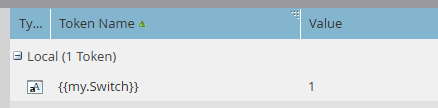
The value “1” is of course arbitrary. I use it to show a Boolean kind of scenario, but you might as well use something more speaking like “start”, “middle” and “end”.
Now we need a hidden field on a form.

Marketo instances we work in usually have a bunch of “flex” or “burner” fields. Fields that have no specific purpose, but can be used flexibly. They also don’t need to hold their value permanently, usually only for the seconds it takes to base a decision on them. In this case, my field is “Flex String 1”, as its field type is “string.
Now, when a person hits the landing page with that form on it, the hidden field “Flex String 1” has the value “1” as defined by the token {{my.Switch}}.
Okay, what can we do with that?
Advanced Thank You Page
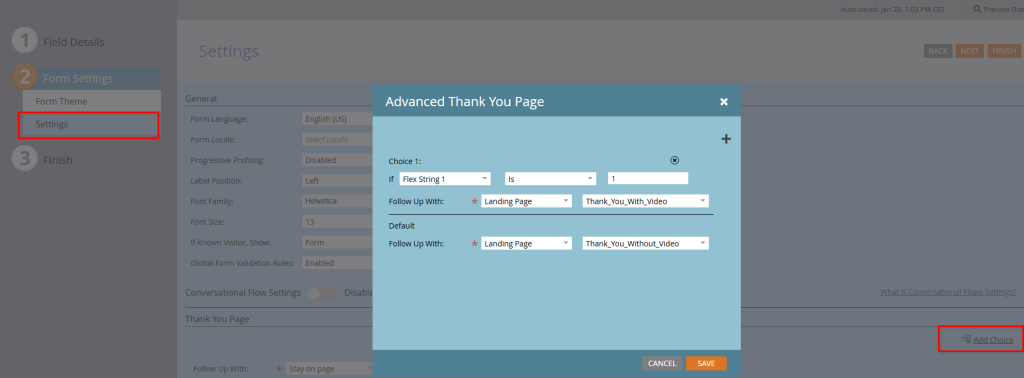
If your token value is “1”, the follow-up page after form submit will be “Thank_You_With_Video”. If not, it will be “Thank_You_Without_Video”.
Form Field Visibility
Lets say, you have a field “Accompanied?” on the form that asks your visitor to check it if they want to visit the event with company. But you don’t need that anymore after circumstances change. Add a visibility rule…

… and control the visibility of the field with your token. If it’s “1” the field shows up, if not “1”, it won’t.
Smart Campaign Choices
Trigger:

Flow:
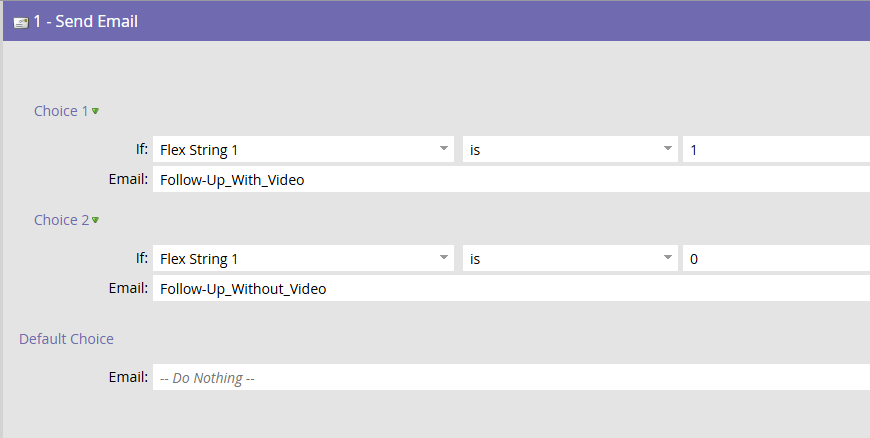
Here you base the choice which email is being sent after form submit on your Program Token.
Real-life scenario
We used this technique recently to cover a specific webinar scenario. After a webinar is over, the registration page is no longer useful. In fact, you need an on-demand process – assuming you have such a thing and send a video of your webinar to your customers.
But when the webinar is over, the recording of the session might not be – yet. You might want to edit it first, and that takes a week or so. So you have an intermediary state where the webinar is over, and the registration page is useless, but the on-demand process is not ready yet. So we use this “Switch Token” to tell the TY page that says “We’re working on the recording. We’ll send it to you once it’s ready”. And when the recording is ready, we change the value of the token to create the final follow-up scenario, both for the TY page and the email follow-up.
What do you think? Like it?