A program token – or my.token – can have three states:
- Local – it’s local to the folder or program it’s in
- Inherited – it comes from above* the folder or program you’re looking at
- Overridden – it’s both local and inherited, but local has higher priority, so the inherited value is overridden.
*Here, “above” means either from a higher folder, from the workspace or from global. Marketo doesn’t tell you from where exactly a token is inherited.
It’s also worth noting that Marketo doesn’t allow you to delete a token when it’s in use. That makes sense – at least at first glance – because if you delete a token in use, the asset where it is in use won’t render it anymore. Still, I say “at first glance” because Marketo allows you to rename a local token – regardless if it’s in use or not – and that renaming would make it as useless as if it were deleted. A little inconsistency, I would argue.
Anyway, that’s not the problem here. The problem is that you might have good reasons to get rid of the status “overridden” and make it “inherited” again. The overridden status is absolutely useful, but it’s also problematic for tokens that are supposed to be inherited. And that is more than ever the case after the invention of Global Tokens.
Here’s an example: You have a Marketo instance and you use tokens for years. Now that Global Tokens are available to you do the right thing and create your token {{my.copyright-year}} in the admin section as a global token. And you assign the value “2026” to it, because the year you live in is 2026. But once you do that, your already existing folder or program token {{my.copyright-year}} becomes overridden, because now it exists both as global and local token. But you don’t want the copyright year to be local anywhere, so what you need to do is delete it to become inherited again. But you can’t because it’s in use. Marketo Support has actually told me, that I have to delete all its occurrences to be able to delete it, but that’s outrageously bad advice. Not only would I need to delete it in x places, but also I would need to reinstate it to all assets after deleting the overridden status.
This bug – I think it can only be called a bug, as this can’t be the desired behavior – is well known for over a decade, and I complained about it repeatedly. But now very recently, Sanford Whiteman posted that you can actually delete an overridden token via API. That post might already give you all the information you need, but for the not so API-native users I wanted to explain the process a little more in detail and also add one caveat.
Please see my blog post on Postman for fundamentals.
First, get your authentication token from your instance. Second, create a new request – or clone any other you already have – and name it “Delete Token”. And as Sanford said, create send your payload to this URL:
/rest/asset/v1/folder/{:programId}/tokens/delete.jsonIn my setup this looks like this:
{{base_url}}/rest/asset/v1/folder/3629/tokens/delete.jsonwhere 3629 is the ID of the program or folder I want to delete the token from. Note that this URL works for both the deletion of program and folder tokens.
Remember that get the ID of a program or folder from the URL in the Marketo UI, which in this case is “1189”.

And here’s the body for your request:
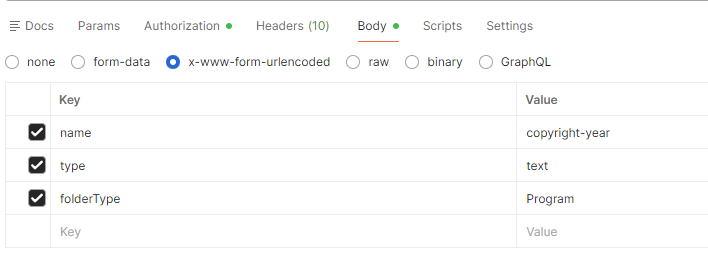
Hit “Send” and your token is gone. And the caveat: You can not only delete overriden tokens which are in use this way, you can also delete any local token that is in use. So a little carefulness is in order. But that’s true for any Marketo action, right?